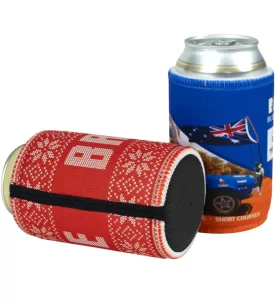
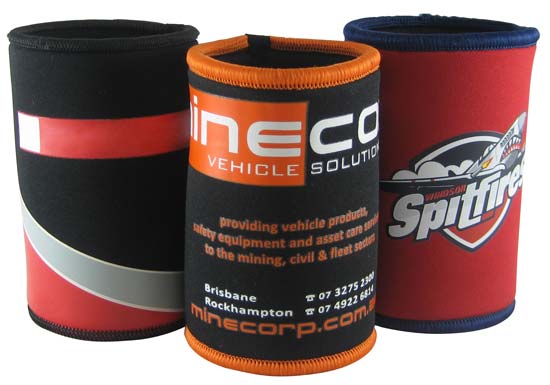
If you’ve ever gone to order custom stubby holders for your business and been asked to “send through your logo as a vector file,” you’re not alone in wondering what on earth that means.
It’s one of those bits of printing jargon that gets thrown around like everyone should already know it. But honestly, most business owners have never needed to know the difference between a JPEG and a vector file until now. So let’s clear it up
Don’t stress, you don’t need to be a graphic designer or know the first thing about printing to get your head around this. Let’s break it down in plain English.
So, what actually is a vector file?
A vector file is a type of image that’s built from mathematical points, lines and curves rather than a grid of coloured dots (which is how photos and most everyday images work).
Think of your logo like a recipe instead of a photo. A vector file doesn’t store your logo as a grid of coloured dots (that’s what a normal photo does). Instead, it stores it as a set of mathematical instructions. Basically, something similar to “draw a line from here to here,” “make this circle this big,” “fill this shape with this exact shade of blue.”
Because of that, a vector file can be scaled up or down to any size (from a tiny favicon right through to a billboard) without losing a scrap of quality.

Why does that matter to you?
For sublimated stubby holders, where your logo often needs to be printed crisp and clean across the whole wrap, this matters a lot. A vector file means your artwork comes out sharp no matter how big or small your design ends up on the final product.
What’s the common alternative, and why is it not good enough?
The alternative is a raster file (also called a bitmap). These are your everyday JPG, PNG, or GIF files, the kind you’d get from a phone photo, a screenshot, or something you pulled off Facebook or your website. They’re made up of a fixed number of tiny coloured squares (pixels).
The problem is, when you stretch a raster image bigger than its original size, those pixels stretch too, and you end up with a blurry, jagged, or “pixelated” logo. Not a great look on something you’re handing out to promote your business.
Why do we ask for a vector file?
The everyday images most people have on hand are logos saved as JPEGs, PNGs pulled off a website, or a screenshot from a Word document, and they are known as “raster” files.
They’re made of pixels, and when you enlarge a small raster image to fit a stubby holder wrap, those pixels stretch and the image turns blurry or blocky. You’ve probably seen this happen when someone zooms too far into a photo.
A vector file sidesteps that problem entirely, which is why it’s the gold standard for anything getting printed, including stubby holders, uniforms, signs, you name it.
It also means our design team can tweak colours, resize elements, or adjust your logo for a particular product without having to rebuild it from scratch.
How do I know if I already have a vector file?
Good news, there’s a simple way to check, no design software required.
Look at the file name and extension. If your logo file ends in any of these, you’re likely in good shape:
- .AI (Adobe Illustrator)
- .EPS (Encapsulated PostScript)
- .SVG (Scalable Vector Graphic)
- .PDF (However, not all PDFs are vector files. More on this below)
If it ends in .JPG, .JPEG, .PNG, .GIF, or .BMP, that’s a raster file, and it won’t be ideal for printing.
An alternative method is to zoom in a lot. If the edges of the image look blurry, you have a raster file. However, if the edges remain sharp, you probably have a vector file.
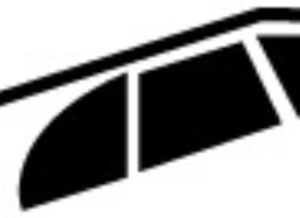
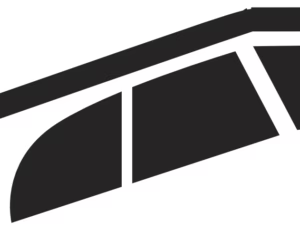
Here’s an example:
Raster file (zoomed in, it looks blurry):
Vector File (zoomed in, it looks sharp):
A Quick tip on PDFs:
Not all PDFs are vector files. Some are just a raster image saved inside a PDF file. If you’re not sure, just send it through to us anyway, we’re always happy to take a look and let you know.
Where to look:
Check with whoever designed your logo originally, a graphic designer, a mate who “did it in Canva,” or the marketing agency you used when you set up your business. Ask them if they can send you the “source file” or “vector file” of your logo.
Peek in your brand assets folder. Businesses that have had a logo done properly often have a “brand kit” or “style guide” folder sitting somewhere in Google Drive or Dropbox, usually with a mix of file types inside. That’s often where the vector version has been quietly sitting the whole time.
When in doubt, just send us what you’ve got. Not sure if what you have qualifies? Don’t stress about figuring it out yourself, send us whatever logo file you’ve got and we’ll let you know straight away if it’ll do the job, or if it needs a bit of work first.
What if I don’t have one?
It’s totally normal, and not a dealbreaker. If all you’ve got is a low-res JPEG or an old PNG, our design team can often redraw or “vectorise” your logo or design for you, so your stubby holders still come out looking sharp. Depending on the complexity of your logo, this might come with a small setup fee,
In summary, vector files aren’t as complicated as they sound. They’re just the format that keeps your logo looking crisp, no matter what size it’s printed at. If you’re not sure what you’ve got, don’t overthink it. Send through whatever logo file you have on hand, and we’ll sort out the rest so your stubby holders come up looking exactly the way they should. That’s what we’re here for, and we’re happy to help!
Ready to place your order?
Find your Stubby holder model here: Stubby Holder Catalog